It is not an easy job to photograph a flower.You could use the photosfor many purposes.In case you have an online flowers shop I don’t have to explain the advantages of a good flower photograph.You could use a flower photograph for your greeting cards, I really don’t like the greeting cards that I get when you see the photo being “photoshoped” as hell until you don’t believe that the picture is real or not…So get in and find out how I took this picture ,hint-its easy and I used only one light…
Archive for category Product photography
How to shoot flowers?
Nov 3
Great product photographs in no time and priceless look,this is what you are going to learn in this tutorial!
If you are not familiar with part I of this tutorial take a look in this link amazing product photography where you’ll get an idea about how I did that setup and the basic two light posing atrategies I talked about .
In part II of amazing product photography using the DIY small softbox (based on a shoe box) will cover another two light setups for some differnt effect,so lets see what its all about.
This is one of the shots you’ll get in this tutorial,so get in read and DIY!
Amazing product photography 1$ technique!
If you want to know how to do this easy 1$ (if you have the off camera flashes) dig in there are some examples and outcomes that you wouldn’t imagine how easy it is to do it!!!
For the bset use of this tutorial you should also read the post on how I made those two easy shoe box soft box for portable flashes (DIY small softbox).
So lets start:About the product photography setup-background and surface :I use a black magnet board as the surface the benefits of it are that you can actually use your studio stuff for other uses,I simple take it when I shoot the products.The black background in this case is a bristol black sheet paper glued to the wall/cupboard.This setup will take you about 5 minutes to build.The second step is to setup the flash in their softboxes.I use the main light at the right side of the product photography object (the canon 30D) I usually start on 1/4 of full power (Canon 550EX),the second shadow light is the Canon 580EX that is set at the begging of the shootout on 1/16 of full power and might be stepped up to 1/8 of full power.The last thing is setting the camera,almost always I start at f 1/7.1 , 1/160sec iso 200.Those settings will “kill” all the ambient light in the room and let the flashes rule!
So lets summerise it:
- right flash=main light 1/4 full power.
- Left flash=secondary light 1/16-1/8 full power.
- Camera : f1/7.1,1/60 sec , ISO 200.
Now lets see what can we produce here!
Product photography setup no.1:
This setup used me for the cover shot on this product photography tutorial.Its one of hte most simple and basic product photography setups available.The main light lights the product photographed,while the second one light from behind with lower power and lights the product curves and lines.This is how I did it:
Product photography setup no.2:
Here we moved the back fill light from setup number one to the front of the product photography object.The effect is different as you can get more details from the front left side of the camera and also maintain the right side domination.Here is the setup used:
Two examples are given for this product photography setup.
For the image above we used the left fill flash on 1/16 of full power.In this case we got much more details on the front left side of the camera and the lens text in the front left side is suddenly showing.If you try to get some details out you’ll also see the top three operation buttons of the camera.In the image below we’ll get the fill flash a stop higher and look what we got:more details!!!
In this setup you extract even more details from the lens,more detail from the cameras top control power(you can actually see that there are four bottons,not three as in the previous picture).
In the next post we’ll explore another two versions of that setup as we’ll move the left light little higher,and in another setup will use only one light to get a more dramatic output.
So stay tuned for more amazing easy to use product photography tutorials and let us know if you have some questions!
Part II now published- easy product photography
Hey this time I bring you a very simple product photography setup,using just one flash (canon 550EX).
We will learn during this tutorial :
- How to simply setup this product photography setup.
- Setting up the only light you need for those professional shots.
- Setting up the camera parameters aperture,shutter speed and iso and the flash power .
- Using some card boards as reflectors,for more pro look photos.
So lets start going!
First of all how we did this extremely simple setup?
1.I have at home some old chair that I use as a table for the small products shoots.You can use any thing you see with the same dimensions – a strong carton box,table,chair or anything.As the board for the products I used a metallic billboard that I no longer use.The advantage of the metallic is obvious,It gives the photos some reflection and rough look. I used here a perspex board , about 40cm*40cm that I have.It will help speard the light from the flash unit in a more equal way .I put the on two boxes that I found in a drawer so there will be some margin between the product and the perspex board.
2.As you can see,I used only one flash here and I mounted it on a flash stand just behind the setup and above the perspex board.
You can see the simple product photography setup here (sorry for the picture bad quality,it was a rip from my first video tutorial for youtube.com):

3.Setting up the camera was an easy thing,I generally start with
- iso400 (when I shoot indoor)
- shutter speed of /160sec (killing ambient light)
- aperture f/6.3 (for good depth of field)
- Flash 1/16 max power
- Camera on tripod and remote control trigger (no camera shakes as using Canon 100mm Macro)
The first two shots where taken with those settings no reflectors used:


As you can see the results are quit sharp and well exposed.No photoshop used here.But we want to give the shots some more light especially at the bottom.
4.For the extra light we used a hand held white reflector (I mainly use a cheap white foam board,as you can see in other tutorials I did here) .The results are better,the bottom side of the cucumber is brighter and you can so more details on the remote trigger as well:


Thats all for this time.If you wonder , the cucumbers are home made cucumbers that I grow in my backyard GREAT!!!
Please share your thoughts and examples here.
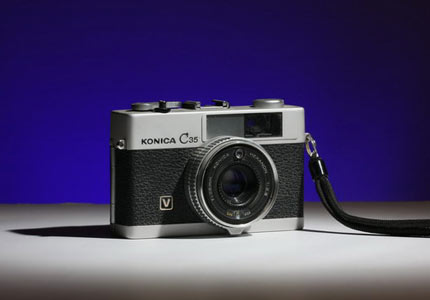
Many times I’m asked how those kind of pictures are taken.I must say that at the beginning I thought that it was a much more complicated process.Actually that when I show this picture to my wife she didn’t believed me that it is mine until I show her the KONICA camera her self.Join this tutorial and read how easy it is to do it!
This post will get you step by step for the final result: a great looking product photo.The product is on a white panel,but the background will be painted with other color that you choose.Here is a little sample of what you can get by using the simple DIY projects done in previous articles.
So lets start with the what you need list:
- White board to use as the surface for the products you shoot-as I do in most of my product shootouts I take some foam borads and use them for the surface and reflectors.
- White perspex board,in case you want to get the reflections as in the picture above.
- Two flash unit-one for the main product light,second for the colored background light.
- White background-it could be the white wall behind the setup,so you don’t have to go and buy stuff.In this tutorial I used another white foam board,but you could also use a Bristol board as well.
- DIY grid .
- DIY colored gel pack (total cost les than 2$).
Lets get going:
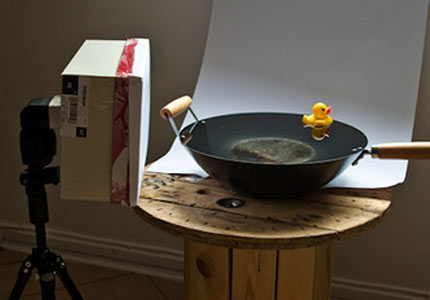
Follow the setup in the picture bellow-
- Put the surface for taking the products shots on a chair.
- The main light will be on a tripod to the left side of the product,shooting through the DIY hot shoe flash grid.
- Put the background behind the chair about a feet away .
- Put the second flash under the chair,cover it with the desired colored DIY gel (it will control the color of your background).
- Starting camera settings- speed 1/160sec, f /8 , Iso 250.
- Starting flash settings – main flash (canon speedlite 550EX through DIY grid ) 1/4 power , second flash (Canon speedlite 430EX through colored DIY gel) 1/16 power.
- You are ready to shoot.
Some additional tips:
- If you want to get a darker color for the background lower the flash power a little or you could also put second color gel filter.
- To get the reflection of the product as in the main picture,use some reflective surface as white perspex board or put above the white foam board a piece of glass.
Here are some sample pictures made with this setup,as you may think there are infinite variation for your fun and games.
With reflections:
Without reflections:
Again two examples for the reflection that can be made just by adding a perspex board to the setup.
Now its your time to show as your photos and tests for such a simple setup!Link your photos in the comments section below.
Here is another basic product photography with one flash light shooting through the DIY SoftBox we made earlier.
This time we are shooting a bottle of Drabuie (whom would have been already empty unless I planed to shoot it…) on a black background.


The ingredients:
- 1 bottle of Drambuie
- Black maple sheet or a black bristol paper (better)
- 1 Flash
- 1 softbox
- white reflector – I used a white 70cm*100cm foam board.
- Good mood – for not drinking the Drambuie
Setup the studio as you can see in the setup pictures.Softbox at one side of the bottle a bit in front of it.I took the first shot at about ISO200,f/8 1/160sec and the flash (Canon 430EX) at about a 1/4 power.I used the Canon 100mm macro (my best advise is to get one if your shooting Canon Dslrs) .From here you should manage yourself just fine,if the picture get a little to dark power up the flash a notch and you’ll be done.
Here are two examples for this setup:
In this setup we added a white reflector to the left side of the bottle.By adding the white reflector we added some lights to that side of the bottle and not keeping it in the dark as in the second picture.As you can see the white reflector also adds some lights to the black background.


Experiment this setup and enjoy your results!
And please share your pictures with us and leave links to your work in the comments section below.
The stuff you need for this setup:
- Two bed or reading lights(bulb should be the same type for the sake of right WB)
- White perspex board (I used here a 40*40 piece)
- Another white panel to use as a reflector (you can use a foam board).
Here are two suggested options to this type of cheap photography:


Take two minutes to put this setup:
- The two lights on the sides.
- The perspex between the lights.
- If you want you can use the reflector on top of the lights.
Here are some results for this setup:
Only right light is on:

Only left light is on:

Top reflector and both lights are on:

Enjoy!Please keep in mind that those photos are not substance for hiring a pro photographer.
There are times in which you want to take pictures of your products and don’t want to have any shadows beneath the products you are shooting.The simplest solution for those cases is to use a light table.Light table or iluminating panel is a thin device that is built of a white panel and a light source under that panel.You put it in your shootout setup under the products and it will hide those shadows.

Here is a “problem” I read in a post in a photography forum:”How could I get reed of the shadows in the attached picture?”.I hear that question a lot.This picture was taken in a light tent with two strobes flashing from the right and left side of it.Usually I will recommend not to get reed of of those shadows,as it gives a sense of depth and capacity to the picture.But if you do want to resolve your problem you should simply put your light tent on some white transparent panel (I mostly use perspex,like in the photos below) and put a small flash to shoot under it.Thats actually what the guy with the question did,he put a mini strobe under a white perspex panel and blup…
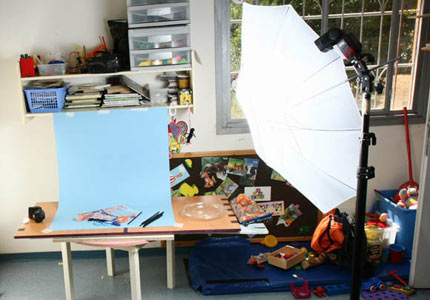
Here is a quick DIY light table setup:

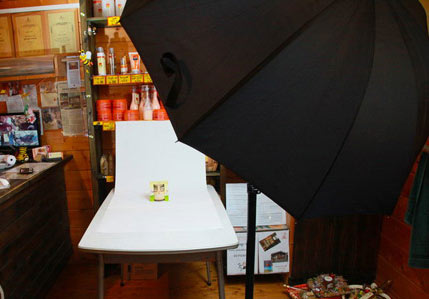
quick light table setup:canon 430EX on the studio tripod full power shooting through a white umbrella.White perspex panel (40cm*40cm) on a stand (You could use any thing of that kind).Canon 550EX SpeedLite 1/4 power wide zoom under the panel.Camre usually on something like f/10-f/13 shutter speed 1/160sec-1/200sec.
Here are some results of the setup:

shot of a pearl necklace.you could notice there is not shadows under the pearl

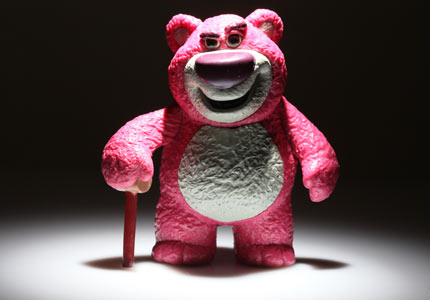
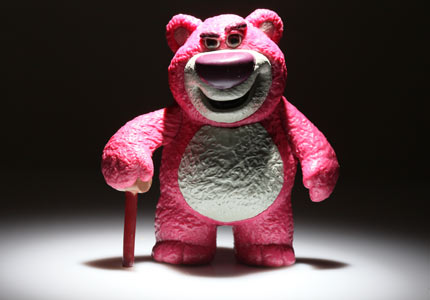
One of my boy’s toy.you could see a lite shadow to the toy’s right.This shadow is made by the main flash from the left.That issue can be resolved with a white reflector add to the setup on the right side of the toy
Share your thought’s with us and comment to that post.
Enjoy!
Easy to do small DIY product photography setup with home made lighting stuff.
Simple studio product photography setup that will get this:

You probably heard the words: “one pictures worth thausends words”…Yep today you must have good pictures of your products in order that the potential web costumer wil shop and buy in your shop!In this lesson I’ll try to show the basics of products photography and how you can do it well with almost basic equipment!
Our role model this time will be the Konica C35 film camera,who looks flewless but lacks of a battery so its days of glory are over for now (not mentioning I use the Pentax SpotMatic SP insteed).So it will be my model for lets say an online used camera on eBay.
What you’ll learn in this tutorial:
- Comparing On-Camera Flash to Studio Lighting(Diy softbox and off camera flash).
- Setting Up a Main Light with the DIY softbox.
- Adding a Fill Light (on camera flash).
- Adjusting fill flash power.
What you’ll need:
- The simple DIY softbox we did here (simple DIY SoftBox)
- One or two flash units ,I use the Canon 580EXII(master flash) and Canon 430EX(flash in my DIY soft box).
- White backdrop.I use a mapel paper-it has some plastic feel,but its more resistant than regular paper.You could use any big sheet of white paper.
- White foam board that will use as the surface for the product photography.
Lets start!
If you read the first post from the series about simple to do product studio photography on budget,
you could read it here:Products Photography for beginners-The most basic setup!!!(Part I).
As I said,those pictures took me just a couple of minutes to take and even thought you can see great improvement from the picture taken without the off camera flash.
But they still don’t look so good,you could see that in figure 2 there is relatively strong shadow that the camera (the product taken shot) throw on the white base.
I’ll share the easiest tip to help partly remove that shadow:
Put another board like you use as the product background on the opposite side of the main flash and it will reflect some of the flash light
(hint:in part III we will use another flash to eliminate the shadows at all)
So those are the out comes:
Regular on camera flash (P mode):

Off camera flash to the left (better picture,but notice the shadows on the right side of the camera):

Off camera flash to the left and white board to the right (reflects some of the light back to the posing camera):

Well this is it for this time!I’ll be happy of you share your pictures/comments here,I’ll be happy to know if that helped you!
P.S.
That is the setup for this tutorial,funny how simple it is…

PEACE